B486104 High Frequency Air Ionizer User Manual
Product Overview
The Botron B486104 is a high-frequency air ionizer designed for superior static elimination (neutralization). It effectively protects electronic components and precision instruments from Electrostatic Discharge (ESD), helping maintain product integrity and manufacturing reliability.
In addition to electronics manufacturing, the B486104 is widely used in industries including plastics, printing, spray coating, pellicle and film production, medical manufacturing, and food packaging—any environment where static control is essential.
The unit is CE approved and designed for safe, reliable operation.
Features
- Robust design suitable for desktop or production line installation
- Powerful and efficient static elimination performance
- Excellent ion balance with rapid neutralization of both nearby and distant objects
- Long-term performance stability
- Power indicator (power switch light)
- Ionization indicator (green light)
- High-voltage abnormality indicator (red light)
- Automatic positive and negative ion balance — no manual adjustment required
- Durable special-alloy discharge needle for enhanced stability and wear resistance
- Easy front louver removal for simplified maintenance and cleaning
- Adjustable airflow and blowing angle
- High-voltage monitoring system with abnormal discharge alarm
- Low HV output
- Short Circuit
- Abnormal discharge
What’s in the Box
- 1 x B486104 Main Unit
- 1 x Power Cord
- 2 x Fixing Holders
- 1 x Instruction Manual
Quick Start Guide
Installation & Operating Location
After securing the main unit using the mounting holders, the blower may be:
- Suspended using a metal chain, or
- Mounted overhead on a workstation frame
Adjust the blowing angle as needed for optimal coverage.
⚠ Do not operate the device in flammable or explosive environments.
⚠ Do not insert objects into the air inlet louver. Keep airflow unobstructed at all times.
Usage Instructions
- Install the main unit with the mounting holders.
- Place the rubber pads between the main unit and stand. Adjust the angle and tighten the knob bolts securely.
- The unit may be mounted on a desk, machine, or production line using the mounting holes (3-φ4.5).
- Connect the supplied power cord to the unit and plug it into an AC power outlet.
- ⚠ Do not use an alternative DC regulated power supply.
- Turn on the main power switch.
- The electrodes will generate corona discharge.
- Ionized airflow will be discharged through the front louver.
- Charged objects within the ionization area will be neutralized immediately.
- Adjust airflow using the control knob as needed.
- The device automatically maintains positive and negative ion balance — no adjustment required.
- If the red alarm indicator illuminates, power off the unit, inspect and correct the issue, then power on again.
- Turn off the power switch after use.
Ionization Performance
Performance testing was conducted in accordance with American EOS/ESD-STM3.1-2000 standards. Each unit is calibrated prior to shipment
Effective Area:
600 mm × 1220 mm
Ion Balance:
Within 0 ± 5 V
Decay Time:
- ±1000 V → ±100 V within 2.5 seconds
- ±1000 V → ±10 V within 4.5 seconds
Note:
- Results may vary depending on environmental conditions.
- Test distance: 450 mm
Daily Maintenance
Regular cleaning is essential to maintain optimal ionization performance.
Cleaning the Front Louver
- Press the side tabs inward to remove the front louver.
- Clean with a cotton swab or rinse with a neutral detergent solution.
- Reinstall only after completely dry.
Cleaning the Discharge Emitter
Dust and contamination may accumulate at the needle tip over time.
- Exercise caution — the emitter tip is sharp.
- Clean gently using a cotton swab (recommended every 100 hours of operation).
- For heavy buildup, use alcohol with a cotton swab.
- Do not damage or loosen the discharge needle.
Replacing the Discharge Emitter
- Press and rotate the needle base clockwise to loosen.
- Use a tool to carefully remove the needle.
- Install the new needle.
- Rotate the base counterclockwise to secure.
Clean the Filter
- Wash with a neutral detergent solution.
- Reinstall only after completely dry.
⚠ NOTE: Failure to perform regular cleaning will reduce ionization efficiency.
Dimensions and Parts
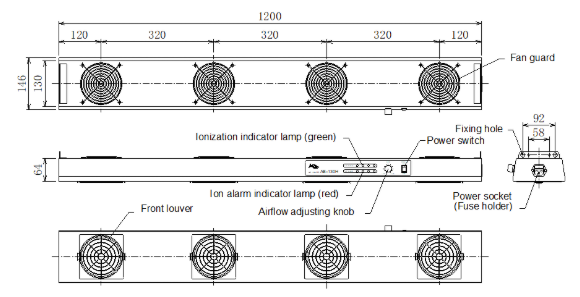
Technical Specifications
Power Supply Voltage:
- AC 100–240V, 50/60Hz
Current Consumption:
- 36 VA
Output High Voltage:
- AC 2200 V
Airflow:
- 185–464 CFM
Noise Level:
- 62 dB(A) at 1 meter
Operating Temperature:
- 0–40°C
Operating Humidity:
- 25–70% RH (non-condensing)
Ozone Generation:
- Less than 0.01 ppm
Weight:
- 7 kg